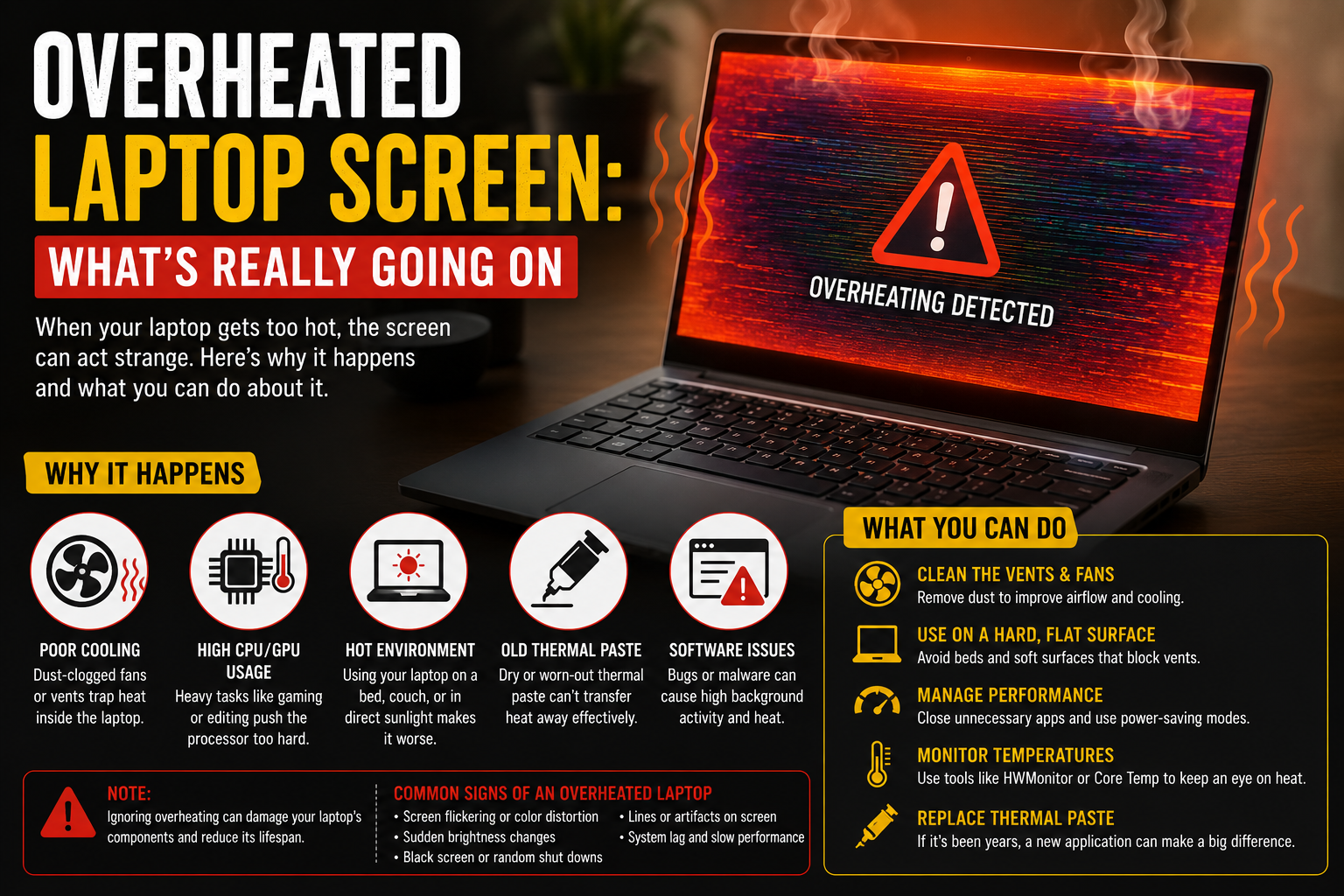
Overheated Laptop Screen: What’s Really Going On
Why Laptop Screens Actually Overheat
Quick correction before we go further: the screen itself isn’t really what overheats. It’s the CPU and GPU underneath, and that heat travels up. Close enough to the display that it messes with it anyway.
Dust is the number one reason, and it’s not close. Fans pull in air, dust rides along, dust clogs the vent, heat gets stuck with nowhere to go. Lenovo actually has a whole page on cooling a laptop down that walks through this same chain of events, and it matches what I’ve pulled out of old machines myself. Grey felt, everywhere.
Second biggest reason, and this one’s almost embarrassing once you know it: soft surfaces. Beds. Couches. Your actual lap, which is sort of ironic given the name. All of them cover the vents on the bottom. FluidStance wrote about this exact thing, and yeah, it’s an easy habit to break once someone points it out.
Does the Brand Matter?
A little. Dell laptop overheating shows up a lot in older XPS and Inspiron models, mostly once the thermal paste inside dries out after a few years of use. HP built an entire support page around HP laptop overheating specifically, which tells you it’s common enough to warrant its own doc. Their official fix guide is decent if you own one.
Lenovo laptop overheating, from what I’ve seen, isn’t really a Lenovo problem specifically. Same dust-and-airflow story as everyone else. Brand doesn’t save you from physics.
Okay, But Can It Actually Wreck the Screen?
Yeah. Not instantly, and not every time, but yeah. Heat that sticks around too long can warp whatever’s driving the display, cause flickering that never fully goes away, or in the worse cases, leave a permanent tint or dead patch behind.
There’s a thread on JustAnswer about a laptop going white-screen from heat that’s a pretty clean example of the worse-case version. Not the norm. Still real.
What About Blue Screens? Black Screens?
Both, actually, and for different reasons. Blue screen is basically the computer panicking on purpose, shutting down before the heat does real damage. Kind of a safety net, weirdly. A black screen leans more toward the GPU specifically losing its output once it gets too hot to keep signaling properly.
One blue screen from heat isn’t a crisis. Three in one week is a pattern you shouldn’t just wait out.
How You Actually Know It’s Overheating
Bottom’s too hot to rest comfortably on skin, not just warm-ish. Fan’s loud constantly, even doing nothing demanding. And the laptop starts crawling, slower than it should be for what you’re doing, which is the machine deliberately throttling itself to survive the heat.
ServicePlus has a rundown on spotting this that lines up with what I just described. Once you’ve felt an overheating laptop once, you clock it instantly the next time.
Fixing It
Simplest fix first. Hard flat surface. Table, desk, anything that isn’t fabric. Fixes more cases than people expect, honestly.
Compressed air in the vents every few months clears out the dust buildup before it becomes a real problem. Micro Center’s guide goes deeper into the actual process if you want the full version.
Cooling pads genuinely help, especially with anything built for gaming. Gaming laptop overheating is sort of expected under heavy load anyway. It’s less about stopping it completely and more about keeping it in check.
When Cleaning Doesn’t Fix It
That said. If the laptop’s a few years old, freshly cleaned, and still running hot, dried-out thermal paste is the likely next suspect. That’s a deeper job than blowing out dust. Unless you’ve opened a laptop before, this is one of those times a repair shop earns what they charge.
Mistakes I See People Make Constantly
- Using it on soft furniture for hours, not realizing they’re sealing off the vents the whole time.
- Brushing off repeat blue screens as random glitches instead of an actual heat warning.
- Never once cleaning the vents. Some people go years. The dust wins eventually.
A laptop that’s constantly hot isn’t just “how that model runs.” That’s a phrase people tell themselves so they don’t have to deal with it. It’s usually fixable.
One Thing Nobody Connects
Heat and a failing battery tend to show up together more than people realize. A swollen or degraded battery can genuinely run hotter than a healthy one. We got into the warning signs of a bad battery in our piece on a laptop trackpad popping out of place, worth a glance if the overheating started around the same time something felt physically off with the case.
If you’re running an older budget laptop, our breakdown of the HP laptop 14s-cf1xxx covers similar-era hardware where this exact heat buildup shows up a fair amount too.
Questions People Actually Ask Me About This
How do I know if my laptop is overheating?
Hot bottom panel, nonstop fan noise, and a slowdown that doesn’t match what you’re doing. Two of those together, and it’s overheating.
Can overheating cause screen flickering?
Yes. It’s one of the more common signs, actually, once heat starts messing with the display connection or the graphics chip.
Can a laptop blue screen from overheating?
Yes. That’s the system protecting itself on purpose rather than letting the heat cause worse damage underneath.
Does overheating permanently damage a laptop screen?
It can, especially if it happens repeatedly over a long stretch. One or two hot days won’t usually leave lasting damage. Months of it might.
How do I stop my laptop from overheating in the first place?
Hard surface, clean vents every few months, cooling pad if you’re running anything demanding regularly. That covers most cases.
So, Overheated Laptop Screen — Bottom Line
Most of the time, it’s not the screen’s fault at all. It’s blocked airflow underneath doing the damage. Give it room to breathe, clean it out once in a while, and don’t shrug off repeat crashes like they’re nothing.